









Hi all,
Never posted before but I have always come here for solutions in the past and usually find them. This one I haven't had any luck so I thought some generous soul here might have the knowledge.
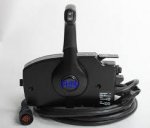
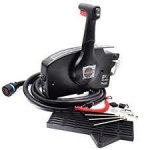
I am towards the end of my first restoration and I am rigging the engine (Mercury Optimax 200 hp 2008) with this remote control


Oem part#881170a20
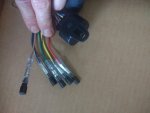
The question I have is, does anyone know what these 5 wires are for? They come off the same extension from the engine cable as the Tachometer plug.

I'm guessing the red wire is power, and that 2 of the wires are for a bow trim switch but I have no idea what the other 2 wires are for. I don't know if I am searching wrong but I can't seem to find anything about these specific wires. In case the picture isn't good the wires are, red, yellow, green, blue and brown. I'm sorry if this isn't the right forum but I have become a little frustrated with my progress at this point in the restoration and my judgment is a tad off.
Thanks in advance.
Never posted before but I have always come here for solutions in the past and usually find them. This one I haven't had any luck so I thought some generous soul here might have the knowledge.
I am towards the end of my first restoration and I am rigging the engine (Mercury Optimax 200 hp 2008) with this remote control
Oem part#881170a20
The question I have is, does anyone know what these 5 wires are for? They come off the same extension from the engine cable as the Tachometer plug.
I'm guessing the red wire is power, and that 2 of the wires are for a bow trim switch but I have no idea what the other 2 wires are for. I don't know if I am searching wrong but I can't seem to find anything about these specific wires. In case the picture isn't good the wires are, red, yellow, green, blue and brown. I'm sorry if this isn't the right forum but I have become a little frustrated with my progress at this point in the restoration and my judgment is a tad off.
Thanks in advance.