FORUM RULES UPDATED - The forum rules have been updated to continue to provide a friendly and safe environment for our member community. Please take a moment to review the updated rules and our terms of use and privacy policy. Click here for Forum Rules which has links to the 'terms of use' and 'privacy policy'.
In Other News . . .
You will notice a few enchancements to the forums to make your experience better. These include: Email Notifications, Thread Previews, Thread Starter Notation, and Emoji Options on the 'Like' icon. . .
Additionally, the merchant portions of the website have been updated and are now operational. . . . Check out iBoats for all your boating gear.
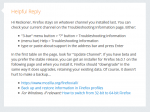
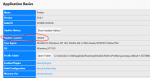
Check your Firefox settings. Make sure that "release" is the Update Channel. The 1st and 3rd options below work to find the setting. The 2nd option is too indirect. The paragraph about the installer applies for the latest version, not just 56.0.1. The write up is from a a few releases ago, the rest is still current. Oh, this is screen snip so the links aren't links, just a picture.
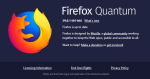
This is what you get after using the 1st or 2nd method;