FORUM RULES UPDATED - The forum rules have been updated to continue to provide a friendly and safe environment for our member community. Please take a moment to review the updated rules and our terms of use and privacy policy. Click here for Forum Rules which has links to the 'terms of use' and 'privacy policy'.
In Other News . . .
You will notice a few enchancements to the forums to make your experience better. These include: Email Notifications, Thread Previews, Thread Starter Notation, and Emoji Options on the 'Like' icon. . .
Additionally, the merchant portions of the website have been updated and are now operational. . . . Check out iBoats for all your boating gear.
Thanks for the quick reply.
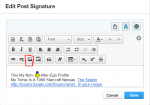
on my edit signurtare it doesn't show up the same way.It doesn't have the camera and chain emblem on left, only the page emblem on right side if that make sence.
Admin says this is supposed to be fixed in the next update. We're holding off on that until the boating season is over while testing. So in the mean time, we'll have to put up with it for a few more weeks.
Sorry guys. I'll see if I can do something behind the scenes, Phil, but no promises.
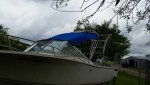
I managed to get the the pic from post #5 into your sig, Phil. It isn't the right way at all. I'm temporarily using my Photobucket account as the source and once the update is installed, we will try the right way with your photo as the source.
That worked Ray ray thanks. The 3 dots.
Also GA boater.
I would like to put a pic of bass boat also side by side if possible.
What would be the best process?
I have pics on phone and in photobucket.
Easiest way is to click the IMG code of the pic you want in Photobucket and when you edit the sig, paste the code into the sig edit block. You can delete the pic I stuck in your sig and do the same thing with your pic instead of the one from my PB account.