FORUM RULES UPDATED - The forum rules have been updated to continue to provide a friendly and safe environment for our member community. Please take a moment to review the updated rules and our terms of use and privacy policy. Click here for Forum Rules which has links to the 'terms of use' and 'privacy policy'.
In Other News . . .
You will notice a few enchancements to the forums to make your experience better. These include: Email Notifications, Thread Previews, Thread Starter Notation, and Emoji Options on the 'Like' icon. . .
Additionally, the merchant portions of the website have been updated and are now operational. . . . Check out iBoats for all your boating gear.
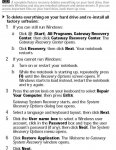
Did it come with a system restore disc? If so put it in the DVD drive and reboot.Or it may have a OS copy on an other partition on the hard drive.
Does it have a drive thats called the D drive?
It has a single drive C: and part of it is called D: Which is called recovery D:
I did make the restore disks when we first got the computer. But they do not list vista a one of the programs. Lists only the junk programs that come on a new computer.
I am guessing that you will need to press a key combination at some point in the boot cycle to activate the restore process.A visit to Gateway or some time spent with your owners manual should point you in the right direction.Ron G
It should tell you on startup to press esc. or one of the F buttons to get into setup.Its usually fast so watch it close.You will see it before it boots into windows.